UX Case study
Streamlining restocking decisions
Coolblue, a leading electronics retailer in the Netherlands and Belgium, is renowned for its exceptional customer service and playful marketing style. During my time there, the company was undergoing a significant transformation, modernising its backend systems to streamline operations and enhance efficiency.
30 – 45min
1 – 3min
+36%
Measured over 6 months

Problem
Why this project?
Coolblue faced a critical challenge: its restocking process was slow, unreliable, and inefficient. The root of the problem lay in the cumbersome decision-making process for buyers.
To restock an item, buyers had to gather and analyse 17 distinct data points, many of which were difficult to access in the outdated system. This manual process, involving data collection, spreadsheet calculations, and manual input, consumed 30 to 45 minutes per decision.
As a result, many products were not restocked in a timely manner, and those that were often faced overstocking issues, leading to wasted warehouse space and increased risk.
Our business analysts identified the slow and unreliable restocking process as a major obstacle to revenue growth. Frequent product unavailability hindered our ability to compete in the market and maximise sales.
Goals
Desired outcome
Three goals framed the work.
- Increase the frequency
- Ensure products are replenished more frequently.
- Reduce overstocking
- Minimise excess inventory to optimise warehouse space.
- Automate easy decisions
- Streamline the process for routine restocking tasks.
Our team aimed to optimise the restocking process by increasing product availability, reducing excess inventory, and automating routine tasks. By creating a learning system that could handle common restocking decisions, we sought to free up buyers' time for strategic initiatives like long-term planning and supplier negotiations. This would not only enhance efficiency but also mitigate the risks associated with human factors, such as memory lapses or turnover, which can harm stock availability.
For example: making sure to secure a stock of barbecues in black, red and green in the winter so they can sell them in the summer of next year. This is an example of how the skills of a buyer can be better applied since it requires active communication with manufacturers, negotiation about price, signing of deals, etc.
Additionally, we wanted to lessen the burden on a buyer's memory. People grow, move to other companies, get sick, forget things. All these circumstances hinder the performance of stock availability in a store.
Team & audience
Who built this, and who for?
Whilst a well-stocked store directly benefits customers, this tool was primarily designed for Coolblue's employees, specifically the buyers responsible for managing restocking orders. Each buyer was equipped with a standard desktop PC, complete with a monitor, mouse, and gamepad controller.
Team's setup
The team comprised one front-end developer (XAML for Windows applications), one product owner, three back-end developers (.NET), and a UX designer (me). The application was designed to run exclusively on Windows desktops, aligning with the company's supported hardware configuration.
My responsibilities
As the first UX designer to delve into Coolblue's back-office systems, I had a broad range of responsibilities. I had to gain a deep understanding of the business operations, partner dynamics, and the specific needs of restocking buyers. I also spoke to stakeholders to gather their perspectives and understand the factors influencing their decisions, including the significant influence of the CEO.
Scope and constraints
Limitations
Rather than A/B testing, we evaluated the product's performance using key business metrics. Given the relatively small user base of 12-24 individuals, it was feasible to conduct qualitative / exploratory research, such as user interviews, with all users.
Process
Step by step description
This text reflects the state of the product during my time at Coolblue. I believe it has evolved significantly since then. For example, the original version was designed for Windows desktops, whereas Coolblue has transitioned to a web-app model.
User interviews
As a pioneer in UX design for Coolblue's back-office systems, I initiated this project before a dedicated product owner was appointed. To gain a comprehensive understanding of the business processes, I conducted interviews and observations with various Coolblue employees. Through this research, I familiarised myself with the company's internal logistics, customer experience goals, and the intricacies of the restocking processes.
Customer journey map
The image illustrates the complete customer journey, from initial consideration to purchase. This visual representation helps guide customers through the buying process, even before they actively engage with the product.
Work as them
To gain a practical understanding of the process, I role-played as a buyer, using the existing tools to place orders. Through this hands-on experience, I gained valuable insights into the intricacies of the decision-making process, identifying three key factors that influence buyers' choices.
-
Should I restock now?
The software determined the need for restocking by identifying products with low stock levels. To assist buyers in making restocking decisions, the system presented relevant information.
-
If yes, how much should I restock?
The optimal restocking quantity was influenced by factors such as available warehouse space and supplier stock levels, which were not always readily accessible. Some suppliers provided real-time stock information, whilst others did not, and contractual agreements and delivery lead times varied amongst suppliers.
-
Can I restock from my selected supplier?
This depends on the points above: contracts, delivery time, stock transparency.
To gain a better understanding of warehouse limitations and existing tools, the team conducted two on-site visits to the warehouses.
Ideation sessions
Through collaborative brainstorming sessions, facilitated by the product owner, we identified the potential to automate many of the restocking decisions whilst reserving complex tasks for buyers. These discussions also highlighted the critical role of the restocking process within Coolblue's overall operations.
3.1. Mapping the old process
To effectively design the product, we focused on understanding the interactions between users and both physical and digital systems across different business areas. I created a visual sequence to illustrate the steps a buyer would take to decide whether to restock a particular product.
Wireframing
I created the initial wireframes outlining the tool's workflow. Under pressure from the CEO, we were tasked with designing a tool that was incredibly user-friendly, even to the point of being controllable with an Xbox gamepad. Whilst I initially interpreted this as a metaphor for simplicity, it became evident that Xbox controller compatibility was a genuine requirement.
Despite this, I ensured that the tool remained office-friendly, functioning seamlessly with a keyboard and mouse.
High-fidelity prototyping
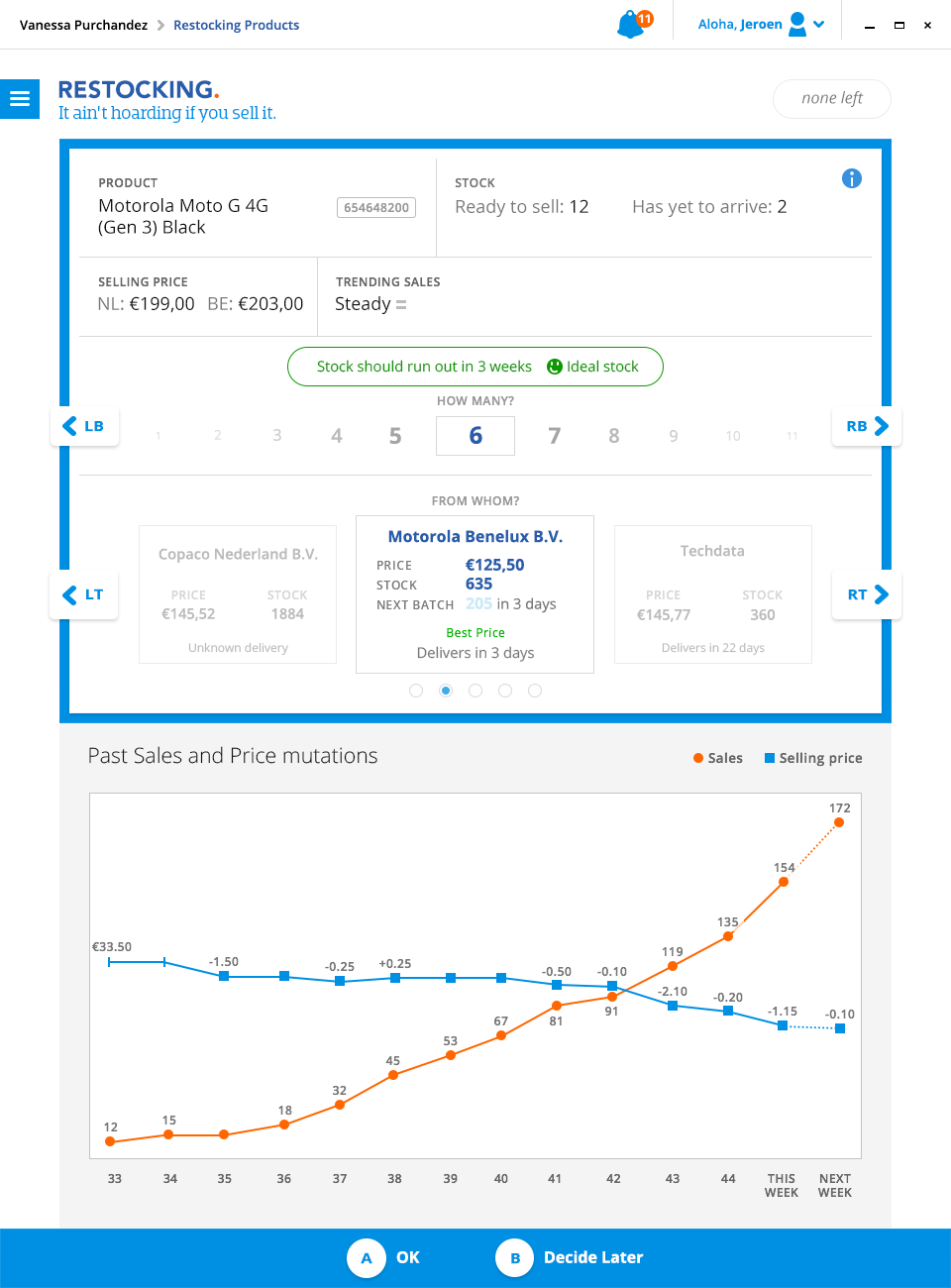
The tool was designed for simplicity, focusing on a single decision at a time. Our goal was to provide buyers with the most relevant information to facilitate quick and accurate restocking decisions.
The tool would automatically identify items needing restocking, and buyers would assess whether to restock, the quantity, and the preferred supplier (initially limited to one). After making a decision, the screen would update, and the process would continue until all restocking needs for the day were addressed.
Validation, iteration & demos
We validated at every stage rather than all at once. Guerrilla testing was simple: sharing a link to the InVision prototype let buyers walk through the design directly, and I documented their feedback for the team.
After launch, I ran feedback sessions following each sprint, eventually inviting buyers into our team room to interact with the live application and question the development team directly. Sprint demos, attended by buyers and stakeholders, kept everyone aligned on new features and progress towards our KPIs.
Conclusion
Results
Buyers now make restocking decisions in the app in just 1-3 minutes, a significant improvement from the previous 30-45 minutes (self-reported).
Buyers reported using the app for approximately 50-60 minutes daily, with variations based on the number of purchase decisions made.
Over a six-month period, product availability across the entire portfolio increased by 36%, including automated orders.
Roughly a quarter of the product portfolio's restocking decisions were fully automated by the learning system, freeing buyers to focus on supplier negotiation and long-term planning.